
WPSubscription V2.0 Review: WooCommerce Subscription Plans Management
A hands-on review of WPSubscription 2.0. Explore centralized subscription plans, real-time metrics dashboards, retention offers, and practical use cases for WooCommerce stores.

MD Zannatun Nime
Selling recurring products on WooCommerce has never been particularly simple. For a long time, store owners had to configure billing schedules for each product individually, juggle complex variations, and watch customers cancel without any retention options.
Setting up flexible WooCommerce subscription plans often required tedious workarounds or multiple add-ons.
WPSubscription 2.0 changes this setup entirely. Instead of locking billing rules inside individual products, version 2 brings reusable subscription plans, a dedicated overview dashboard, and built-in cancellation offers.
In this review, we explore what changed with introducing WPSubscription v2, how the new plan system works, and where it makes the most sense for online stores.
Subscription Plans
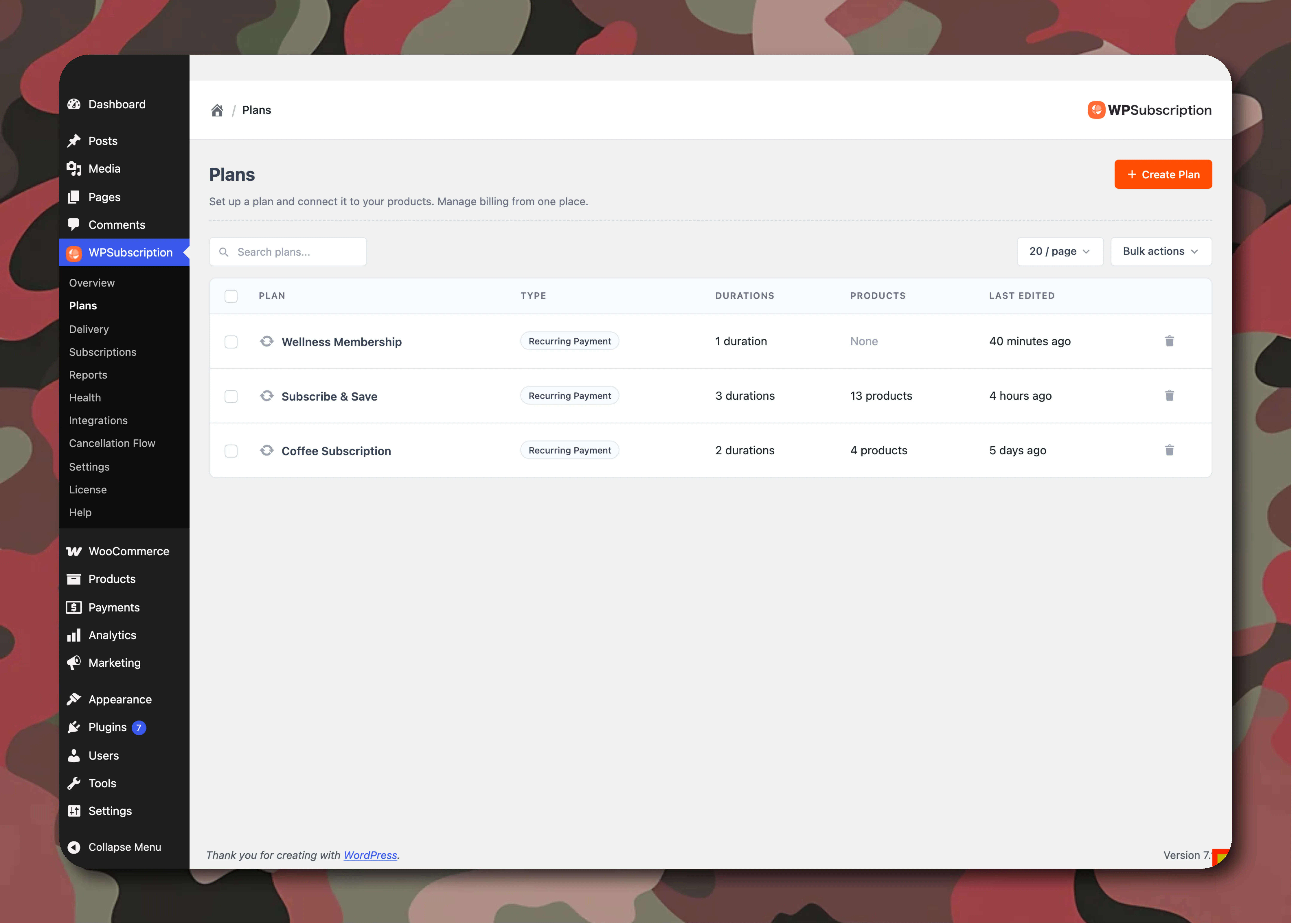
The biggest change in version 2 is how plans are managed. Previously, subscription settings were attached directly to each individual product. If you sold twenty different items on a monthly replenishment cycle, you had to set up that same schedule twenty times.
In version 2, you create a plan once:
- Define the plan: Choose billing intervals, trial periods, and signup fees in one central place.
- Connect products: Attach any products from your store catalogue to that plan.
- Set prices: Products keep their own base price while automatically sharing the schedule.
When you need to adjust a trial duration or change an interval, you update the plan once, and every connected product updates automatically. This centralized architecture makes managing multiple subscription plans much faster and easier to maintain across large catalogs.
Multi-Duration Selectors and Offer Pricing
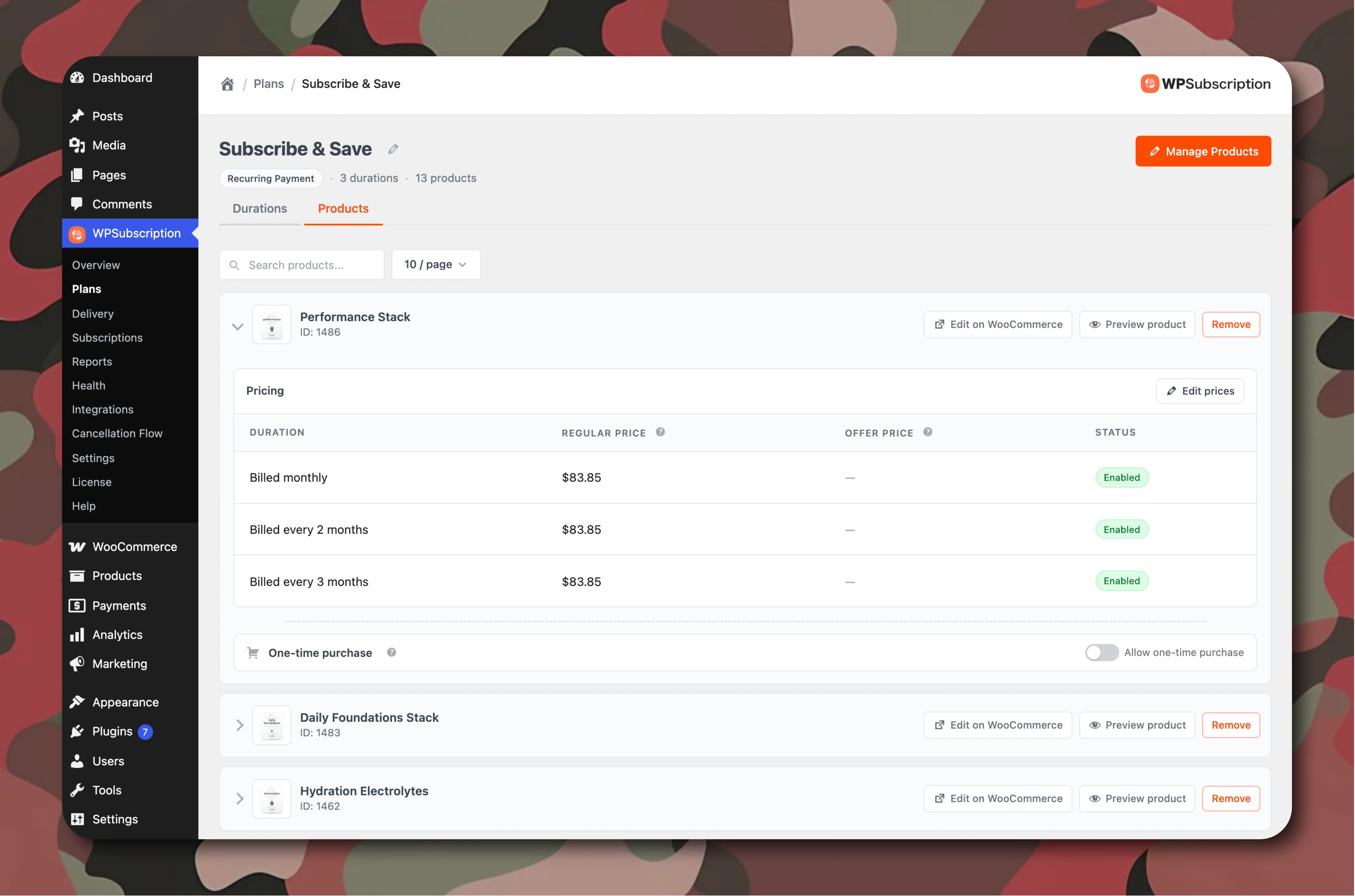
A single plan can now hold multiple plan durations, like Monthly, Quarterly, and Annual, directly on the product page. Store owners can structure custom WooCommerce subscription plans with tiered billing periods without duplicating product entries.
Offer Pricing and Savings Badges
You can set discounted rates for longer commitments. The plugin shows strikethrough prices and savings badges (like Save 15% or Save 25%) to encourage shoppers to pick longer plans over monthly options.
Offering tiered pricing across different subscription plans helps increase average order value and customer retention.
One-Time Purchases Side by Side
You can keep standard one-time and recurring purchases active side by side next to subscription options.
Shoppers who are not ready to subscribe can still buy normally, while seeing the exact savings they would receive if they subscribe.
Storefront Buy Box
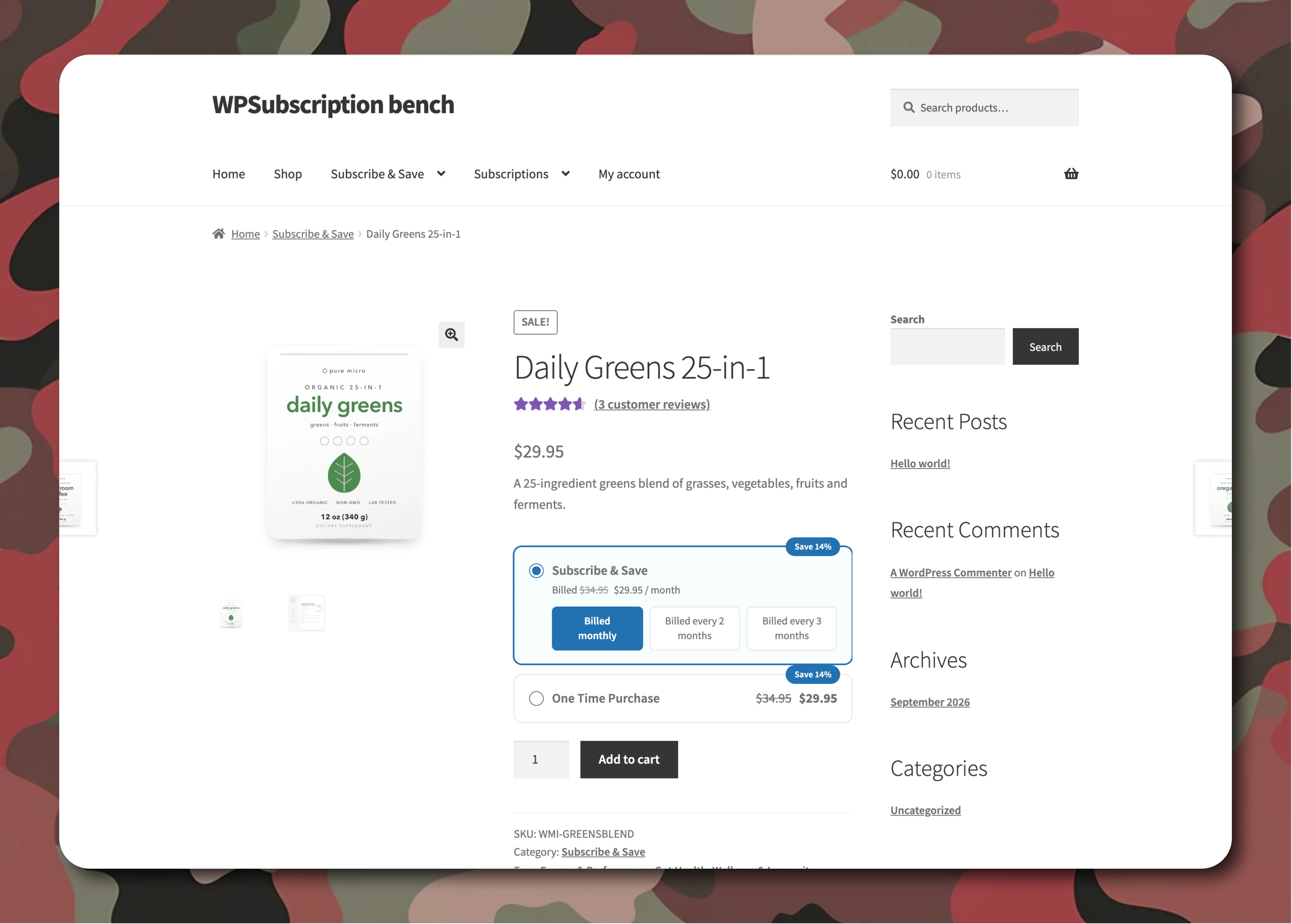
The customer-facing storefront plan display above the Add to Cart button was completely redesigned for a cleaner look.
- Quick switching: Shoppers toggle between billing periods with instant price updates and no page reload.
- Clean mobile layout: The selector stays compact so the purchase button remains easy to tap on phones.
- Clear billing terms: Shoppers see renewal details upfront before heading to checkout.
Shoppers get a clear, interactive interface to evaluate different subscription plans before making a decision.
Direct Checkout and Add-to-Cart Links
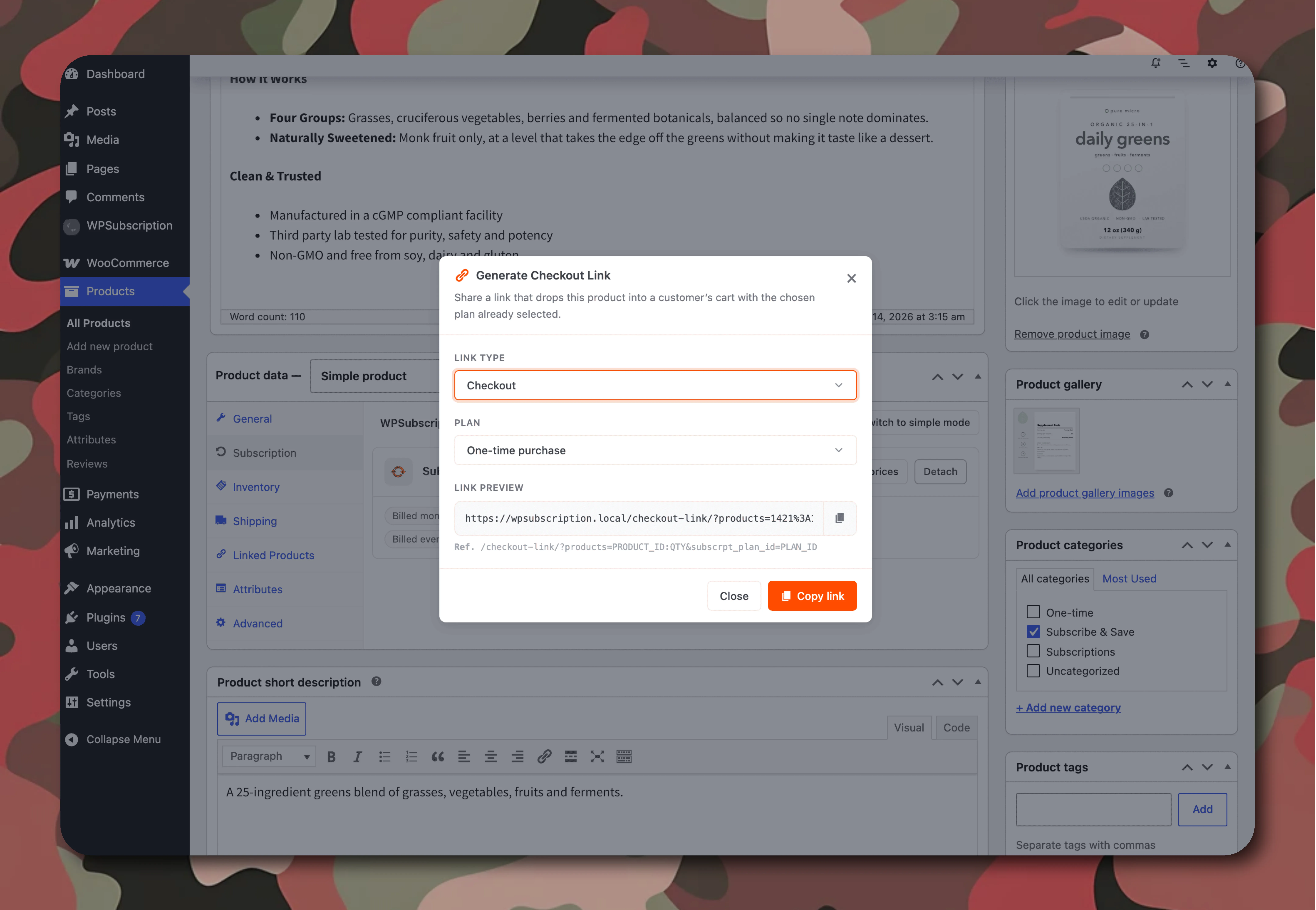
Sending people to a product page can add unnecessary steps during email campaigns or promotions. Version 2 lets you generate direct checkout links for any product and duration:
- Instant checkout: Links take buyers straight to checkout with their plan already selected.
- Simple promotions: Great for newsletters, special offers, and quick upgrade links.
These direct links simplify marketing campaigns by letting customers sign up for specific subscription plans with a single click.
Overview Dashboard
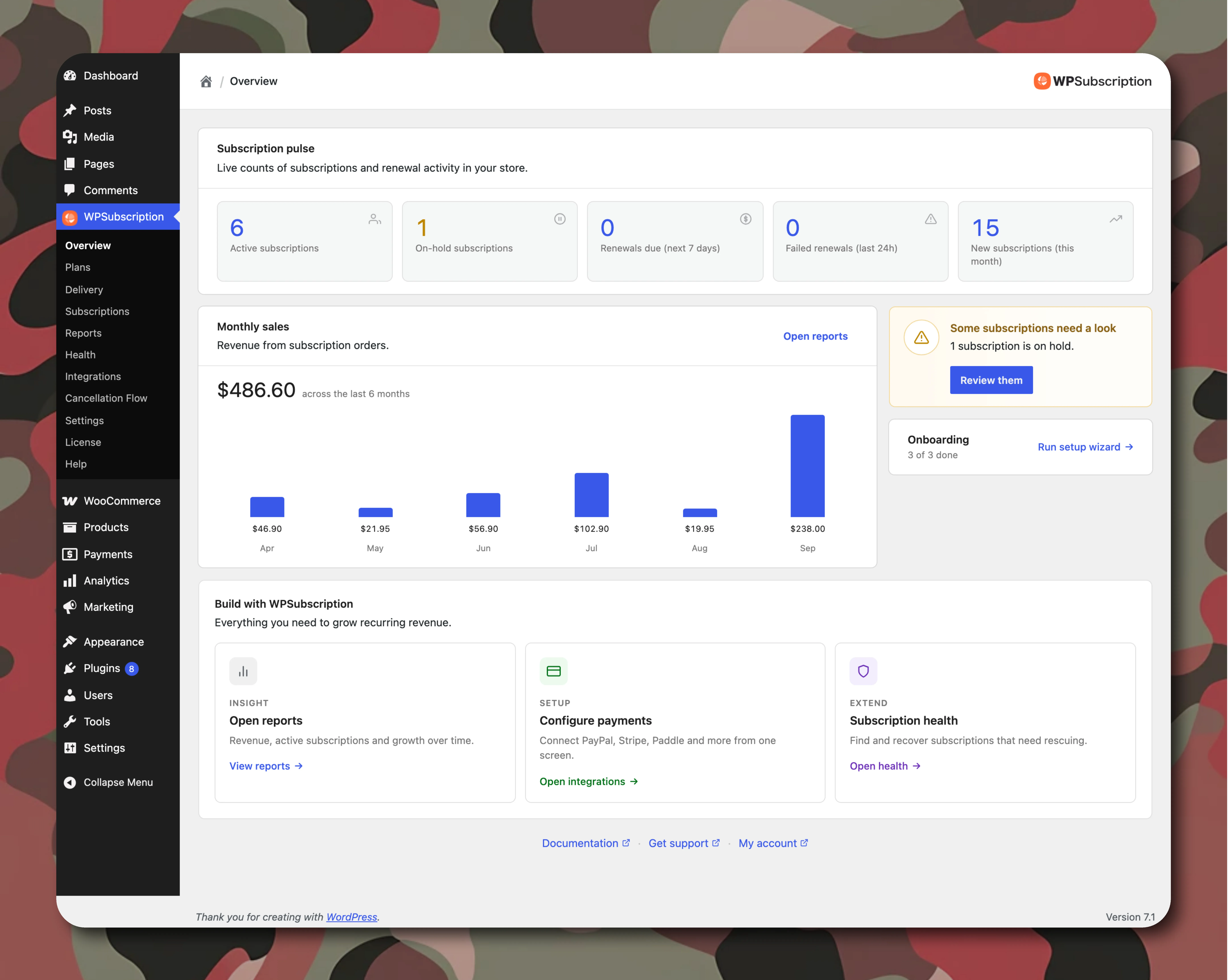
Tracking recurring orders through default WooCommerce screens can be difficult because regular orders and renewals get mixed together. Version 2 adds a dedicated overview dashboard screen at WPSubscription → Overview.
Status Pulse Metrics
Get a quick look at your store health:
- Active Subscriptions: Total recurring customers generating ongoing revenue.
- On-Hold Accounts: Subscriptions that need card updates or payment retries.
- Renewals Due (Next 7 Days): Clear short-term renewal forecast.
- Failed Renewals (Last 24 Hours): Immediate notice if a payment attempt fails.
Separate Recurring Revenue Chart
A 6-month chart separates new signups from recurring renewals, so you can track actual recurring growth instead of mixed sales data.
The Smart Attention Card
A prompt at the top highlights urgent operational items, such as missing payment gateway setups or failed renewals that need attention.
Retention Offers and Cancellation Flow
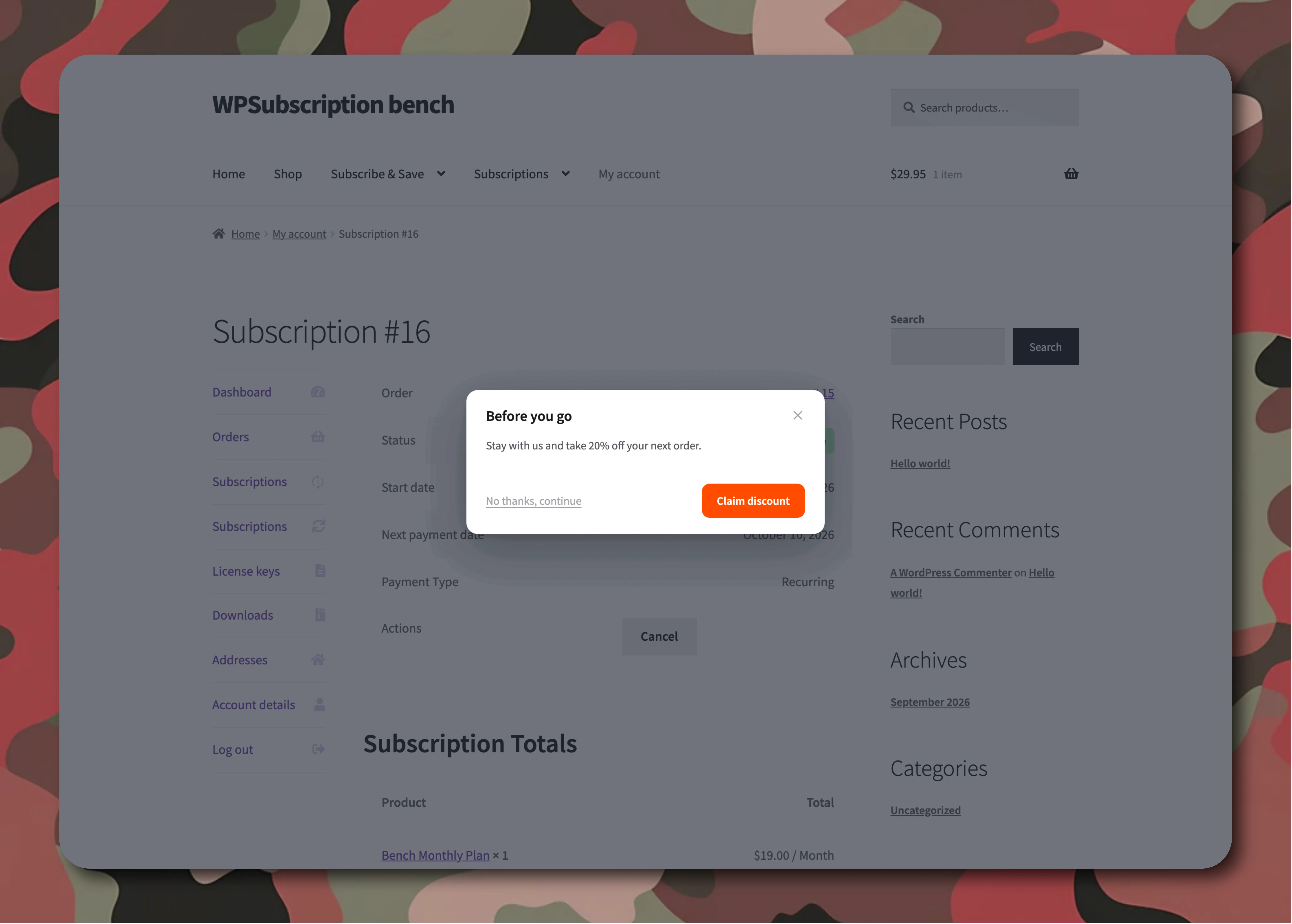
Losing subscribers directly hurts recurring revenue. Instead of a basic cancel button in the customer portal, version 2 adds an automated cancellation flow to help save the subscription.
Before You Go Offers
When a customer clicks cancel in their account, you can show a retention discount (like 20% off their next renewal).
The plugin generates single-use recurring retention coupons that apply automatically to the next payment without requiring manual intervention from administrators.
Exit Surveys
If customers still want to leave, you can ask why using customizable cancellation survey options (Too expensive, Temporary pause, Found an alternative).
The system stores all feedback in the admin dashboard. Customers have the flexibility to cancel immediately or keep their access active until the end of the paid billing cycle.
Transparent Cart and Checkout Breakdown

Nobody likes unexpected charges. The cart and checkout screens clearly display all renewal details:
- Amount due today
- Next renewal date and recurring amount
- Exact discount applied for subscribing
Practical Use Cases for WPSubscription v2
Here are a few common ways store owners can use the new plan architecture:
Physical Product Subscriptions (Subscribe & Save)
- Examples: Coffee beans, pet supplies, supplements, or skincare.
- Setup: Create a delivery plan with 30-day and 60-day options, offering a 10% or 15% discount compared to one-time purchases. Configuring targeted WooCommerce subscription plans allows brands to offer recurring deliveries with tailored discounts for loyal buyers.
Digital Access and Memberships
- Examples: Software licenses, digital asset libraries, or ongoing agency retainer services.
- Setup: Provide monthly and yearly payment options on a single page with automated retention offers upon cancellation. You can also send direct checkout links in client proposals for one-click onboarding.
Split Payments and Installments
- Examples: High-ticket workshops, online courses, or design sprints.
- Setup: Set up fixed installment plans (like 3 monthly payments of $150) that stop automatically when completed.
Free vs. Pro Feature Overview
WPSubscription offers a free plugin version on WordPress.org alongside a feature-rich Pro edition. Check the complete Free vs Pro comparison to see which plan fits your store:
| Feature | Free Version | Pro Version ($89/yr) |
|---|---|---|
| Centralized Subscription Plans | Included | Included |
| Storefront Plan Selector Buy Box | Included | Included |
| Offer Pricing & Savings Badges | Included | Included |
| Direct Checkout & Add to Cart Links | Included | Included |
| Overview Dashboard & Pulse Metrics | Included | Included |
| Cancellation Exit Surveys | Included | Included |
| Before You Go Retention Offers | — | Included |
| Customer-Locked Renewal Coupons | — | Included |
| Flexible Cancellation Timing (End of Term) | 24h Default | Full Control |
| Split Payments & Fixed Installments | — | Included |
| Recurring Delivery Sync for Physical Goods | — | Included |
| Automated Payment Recovery | — | Included |
Backward Compatibility & Upgrading
Upgrading to version 2.0 is safe for existing stores:
- Zero interruption: Existing subscriptions keep renewing on their original terms.
- Classic mode toggle: Product settings include a toggle between classic mode and the new plan architecture, so you can transition products whenever you are ready.
Summary
WPSubscription 2.0 provides WooCommerce users with an intuitive system to launch, manage, and scale subscription services. Separating plans from products saves significant setup time, while the overview dashboard and retention flows help protect recurring revenue.
Store owners gain full flexibility to create and manage scalable subscription plans that match their business model without extra clutter.
The update offers a straightforward solution for store owners who need to handle their recurring payments through an efficient system which eliminates all unneeded elements.
Get Started with WPSubscription 2.0
Create reusable subscription plans and grow recurring revenue on your WooCommerce store.
Written by
MD Zannatun Nime
September 16, 2026
MD Zannatun Nime writes about WordPress, developer tools, and web design in a simple and easy-to-follow way. He enjoys making complex topics clear, practical, and useful for everyday readers.
Related reading

WOOCOMMERCE
7 Essential WooCommerce Tools for Personalized Products
WooCommerce tools for custom products help you manage personalization, pricing, SEO, checkout, shipping, and repeat sales through one coordinated store workflow.

WOOCOMMERCE
Best AI Product Recommendation Plugin for WooCommerce
Looking for the best AI product recommendation plugin for WooCommerce? Learn how AI recommendations work, compare top plugins, and set up personalized product suggestions step-by-step.
WOOCOMMERCE
How to Export WooCommerce Products as an XML or CSV Feed [2026]
Learn how to export WooCommerce products as CSV or XML step by step. Plus, find out when you need a product feed to sell across 200+ marketplaces like Google Shopping, Facebook, and TikTok.