
How To Change WordPress Login URL Without Plugin (A Complete Guide)
WordPress is one of the most popular CMS and therefore it is targeted most often. Anyone can easily find the default login page by adding ‘wp-admin’ or ‘wp-login.php’ in the URL. Hackers use different strategies to hack your website, and one of the most common is ‘brute force attack.’ In this way, attackers try to…
Parvez Akther
WordPress is one of the most popular CMS and therefore it is targeted most often. Anyone can easily find the default login page by adding ‘wp-admin’ or ‘wp-login.php’ in the URL. Hackers use different strategies to hack your website, and one of the most common is ‘brute force attack.’
In this way, attackers try to gain access to your website by guessing the login password of your site. One way to secure your login page is to change the login URL of your site.
This article will show you how to manually change WordPress login URL without a plugin. Before you start altering anything, backup your files. The backup will always save you from a disaster. Let’s do this.
Tools need to Change wp-admin URL Without Plugin you need
Before starting the process, you need a code editor. Here are some recommended code editors:
- Notepad++
- Sublime Text
- Atom
We have used Sublime Text in this article.
Let’s Begin the Process
The wp-login.php file comes with all the codes that generate the login page and handles the login sequence. We are going to use the code from wp-login.php in our new file.
When you rename wp login php file, it will change your login URL. All you have to do is access the files of your site with a text editor.
There are 4 things we are going to do:
- Download the ‘wp-login.php’ file.
- Change the login url.
- Upload the new file.
- Test the new file.
- Download the ‘wp-login.php’ file
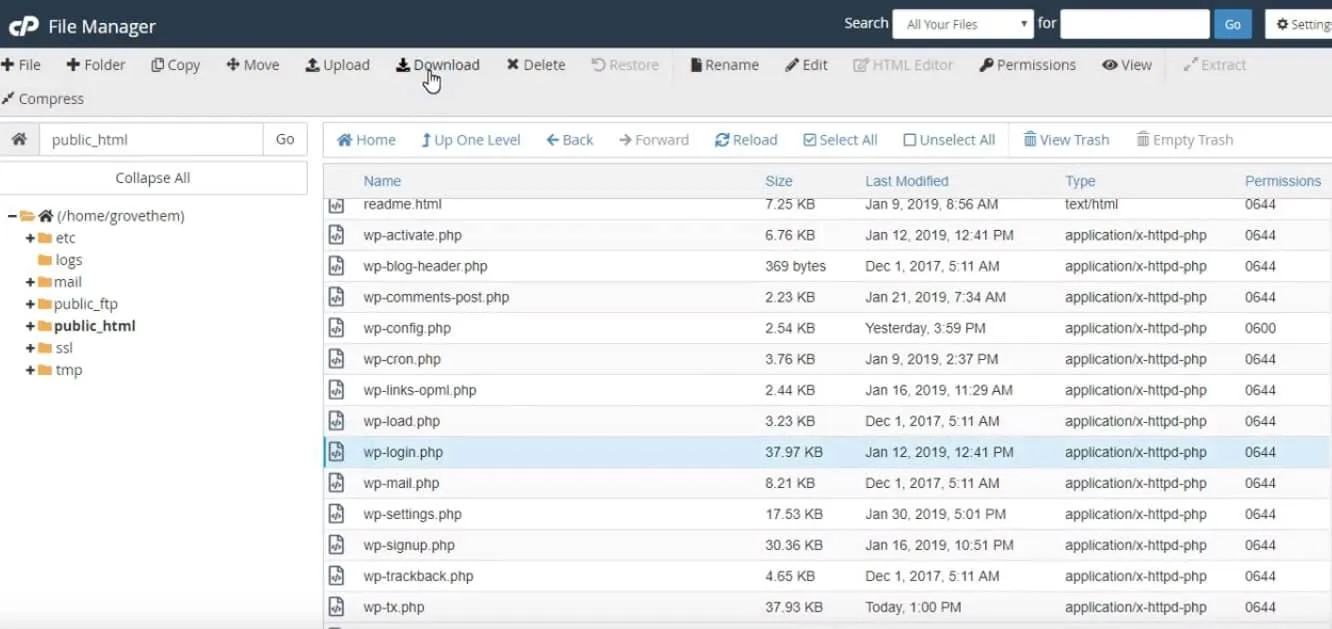 First login to your sites administrative area using your id and password. Now go to file manager > public_html and download the ‘wp-login.php’ file.
- Change the login url
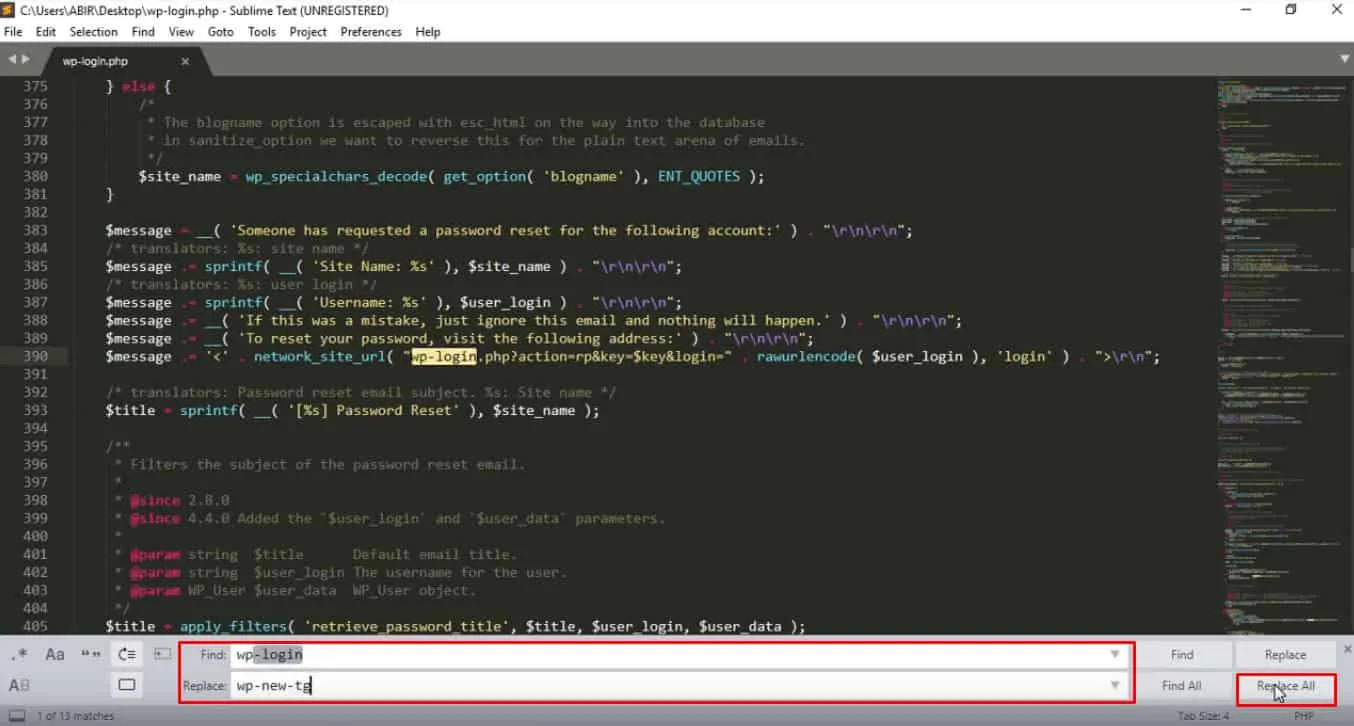 Open the downloaded file with sublime text editor(or one that you prefer to edit your text file). From menu bar go to ‘Find > Replace’ and search for ‘wp-login’. Then replace all of the instance with your preferred url (I used ‘wp-new-tg’) and save the file.
Now rename the file with the URL you used.( I renamed it ‘wp-new-tg’.)
- Upload the new file
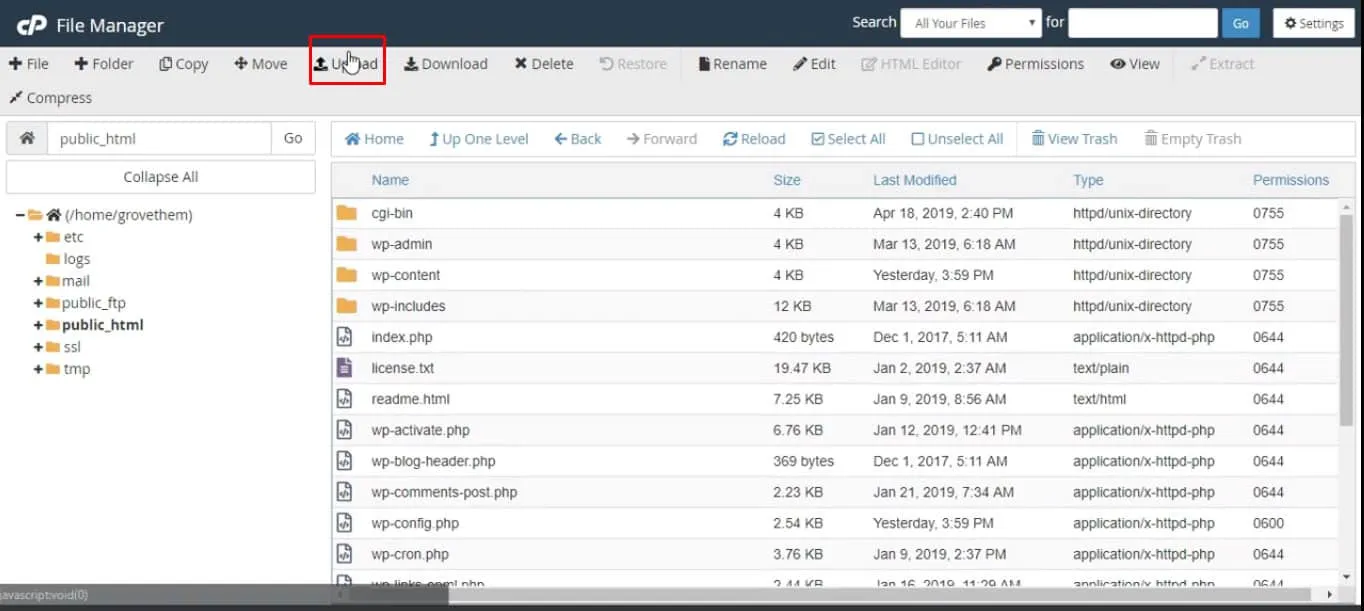 Again login to your sites administrative area and go to file manager. Now click on ‘upload’ button and upload the file that you modified. Then delete the ‘wp-login.php’ file.
- Test the new file
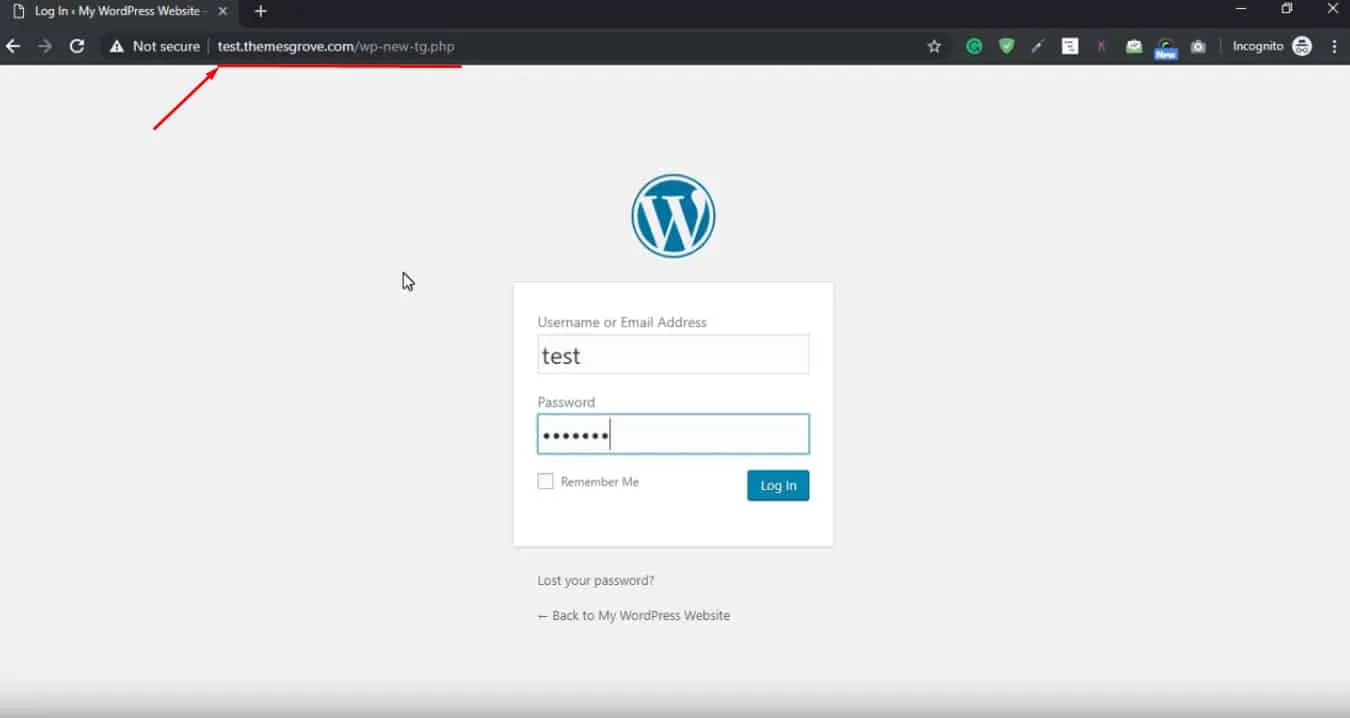 Now you can login with the new URL. Type your site URL with the new name. For me it is ‘test.themesgrove.com/wp-new-tg.php ‘. Any requests to ‘wp-admin’ or ‘wp-login’.php will lead visitors to 404 not found page.
If you still can’t figure out, check this video from below.
(Bonus) Why You Should Use a Plugin to Secure Your Login Page
There are some obvious reasons why it is better to use a plugin to secure your login URL. Creating a new login path will not give you any issues with your future updates and its a best practice to protect the core.
You might run into compatibility issues with plugins which contain code with wp-login.php. There are lots of trustworthy plugins available in the WordPress plugins directory for free. You can also use .htaccess to secure your login page, but it comes with complexity. Additionally, misuse of rewrite rules can consume all your memory of the server.
The best way to change your login page is that you use a plugin. Let’s check some of those.
WPS Hide Login
There are a good number of free plugins and this is one of them. WPS Hide Login lets you change the login form with a single click. You can set it for your entire network or for a single site. It neither uses redirects nor changes the core files and very lightweight.
You can download this plugin from the WordPress plugin repository and instantly change your WordPress login URL.
iThemes Security

iThemes Security is another good plugin to change the login URL of your site. Besides it provides you 30+ additional ways to secure and protect your WordPress site. This plugin provides you all the modern facilities to protect your website from intruders.
P.S Take one-time or recurring paying using WooCommerce and sell product online. Checkout our new paddle for woocommerce plugin
Conclusion
For increasing the security it is a best practice to change the WordPress login URL. But if you want to do it easily and add more security layers, it is best to use a plugin. What do you think? Do you have any better suggestions?
Written by
Parvez
April 27, 2019
Founder of ThemesGrove and a tech veteran with deep experience across WordPress, products, and web platforms.
Related reading

TIPS & TRICKS
How to Turn Public Data into a Revenue-Generating Directory Website for Under $30
Discover how directory websites can become profitable online businesses. Learn two proven directory models you can build with WordPress using publicly available data and affordable tools.

TIPS & TRICKS
Introducing Advanced Tab for WidgetKit to Present Your Content in an Organized Way
Do you ever wonder why your website losing hundreds or thousands of visitors? Research Shows website design has a 75% influence on a website’s credibility, and here having unorganized content can hurt your website design so badly. The sole purpose of your website should be attracting customers, encouraging them to interact with the content, and…

TIPS & TRICKS
Webflow vs WordPress: Which is better for your website?
Are you trying to decide between Webflow and WordPress for your new website? Maybe you’re feeling overwhelmed by the endless options and don’t know where to start. Don’t worry; we’ve all been there. In this article, we’ll compare Webflow vs WordPress head to head, covering their pros and cons, features, and pricing, and help you…