
EasyCommerce Review (2025): Details, Pricing, Features, Pros, and Cons

If you have ever tried setting up an eCommerce store, you know it’s rarely as easy as the platforms claim. Some eCommerce platforms come loaded with features but feel like they require a developer to operate. Others have a higher cost of essential tools you actually need to run your business. That’s where EasyCommerce promises…
Zannatun Nime
If you have ever tried setting up an eCommerce store, you know it’s rarely as easy as the platforms claim. Some eCommerce platforms come loaded with features but feel like they require a developer to operate. Others have a higher cost of essential tools you actually need to run your business.
That’s where EasyCommerce promises to be different. It’s built specifically for users who want a smooth, intuitive setup. EasyCommerce aims to strike the right balance between usability and capability.
In this review, we’ll take a close look at what EasyCommerce actually delivers, including its pricing, core features, and comparison with other platforms.
Let’s start with what to look for in a great eCommerce plugin!
What is EasyCommerce?
EasyCommerce is a WordPress plugin that adds a full online store to your site. It’s light, fast, and made to fix the common problems people face with WooCommerce.
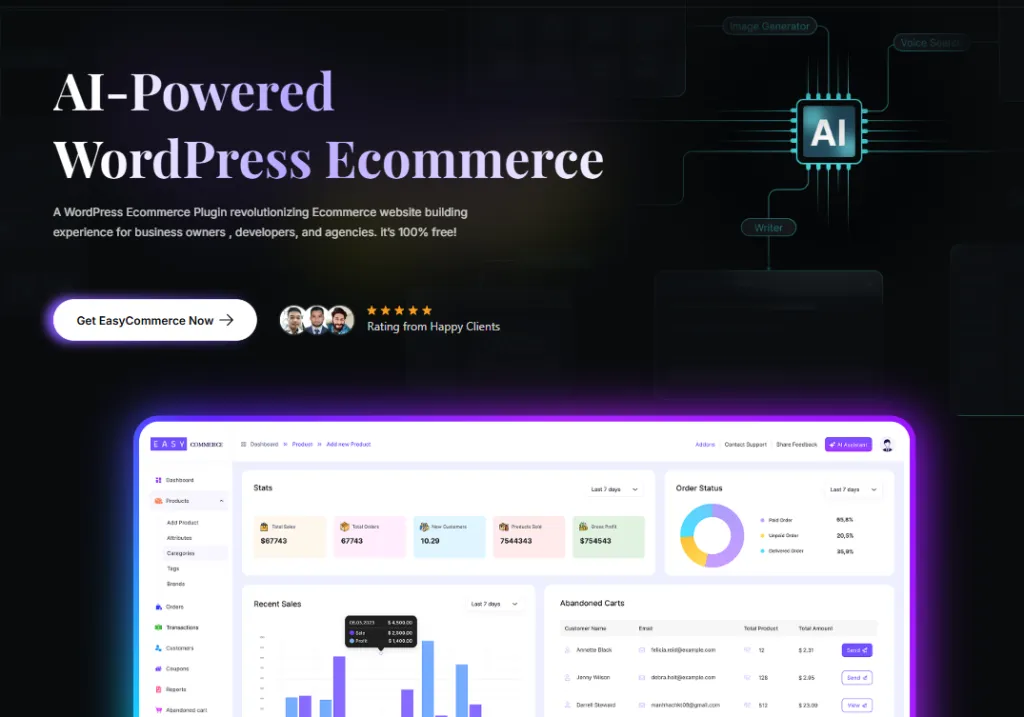
With EasyCommerce, you don’t need a bunch of extra tools, as things like digital product sales, coupons, and cart recovery are already built in.
It’s a great pick for small business owners, solo entrepreneurs, or anyone who wants to start selling online without hassle. The core plugin is free, and if you need more features, you can unlock them with optional add-ons.
EasyCommerce Plugin Features to Run an Online Store Smartly
EasyCommerce is packed with user-friendly features to simplify your store management, improve conversions, and save time. While checking EasyCommerce, we found many modern things that make it different from the eCommerce alternative.
Let’s find out what’s inside EasyCommerce.
1. AI-Powered Smart Tools
Managing an eCommerce store means creating lots of content like descriptions, summaries, and more exciting features.
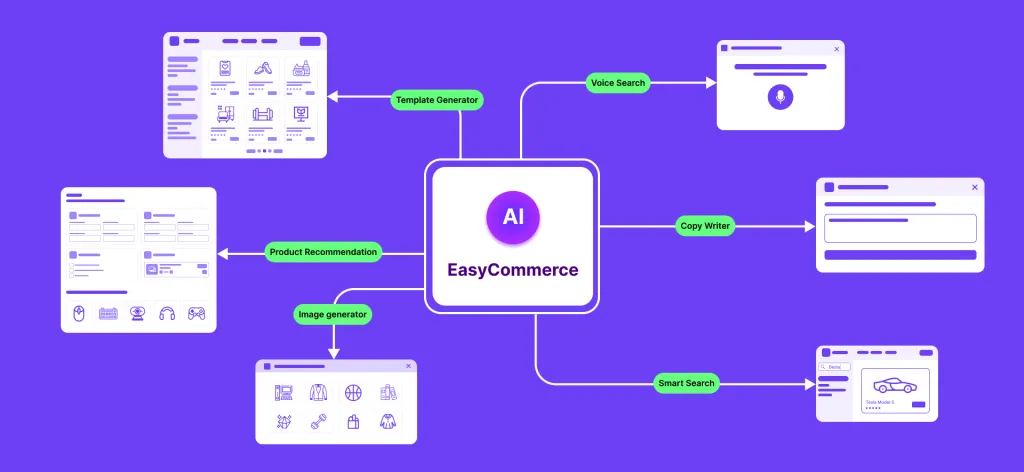
AI tools powering your EasyCommerce store include-
-
AI Copywriter: Instantly create high-quality product descriptions and summaries to save time and improve your listings.
-
Admin AI Chatbot: An intelligent chatbot support assistant to answer your queries while creating your eCommerce store.
-
AI Image Generator: Generate unique, copyright-free product images using artificial intelligence.
-
AI Smart Search: Catches misspelled searches and shows the closest matching results. This ensures your customers never see a ‘No product found’ message again.
-
AI Product Recommendation (upcoming): Suggest personalized products to increase cross-sales.
-
AI Template Generator (upcoming): Customize existing product pages with just a prompt. You can save them as well for repeat use.
-
AI Voice Search (upcoming): Let customer search their intended products using voice commands for faster, hands-free browsing.
2. Intuitive Dashboard
Running a store shouldn’t require switching between a dozen different analytics tools. EasyCommerce’s intuitive dashboard gives you an instant overview of everything.
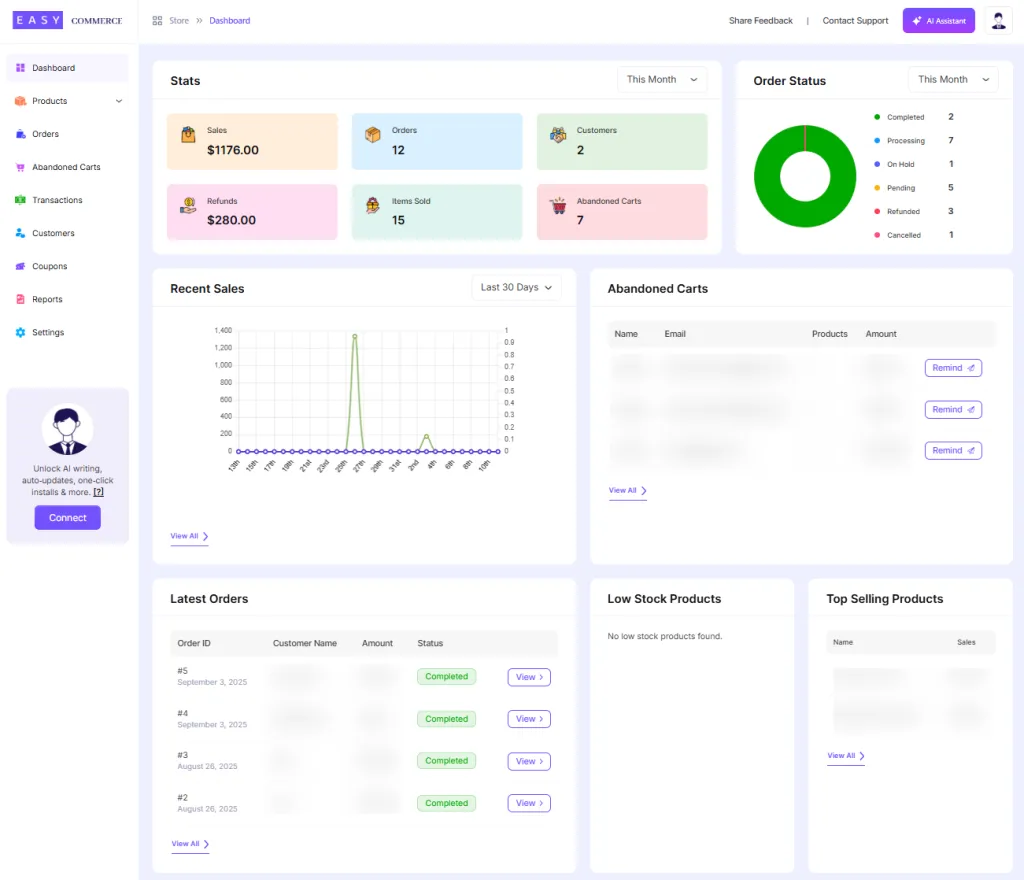
This includes total sales, orders, abandoned carts, trending products, Low stock products, and more, through easy-to-read charts and stats.
3. On-Page Product Listing and Management
Like WooCommerce, EasyCommerce also features a single-page product listing interface to keep things simple and familiar. The difference is that EasyCommerce keeps everything (inventory, pricing, attributes, and other details) on one page.
WooCommerce, on the other hand, splits them into separate tabs and extra pages, which takes more time.
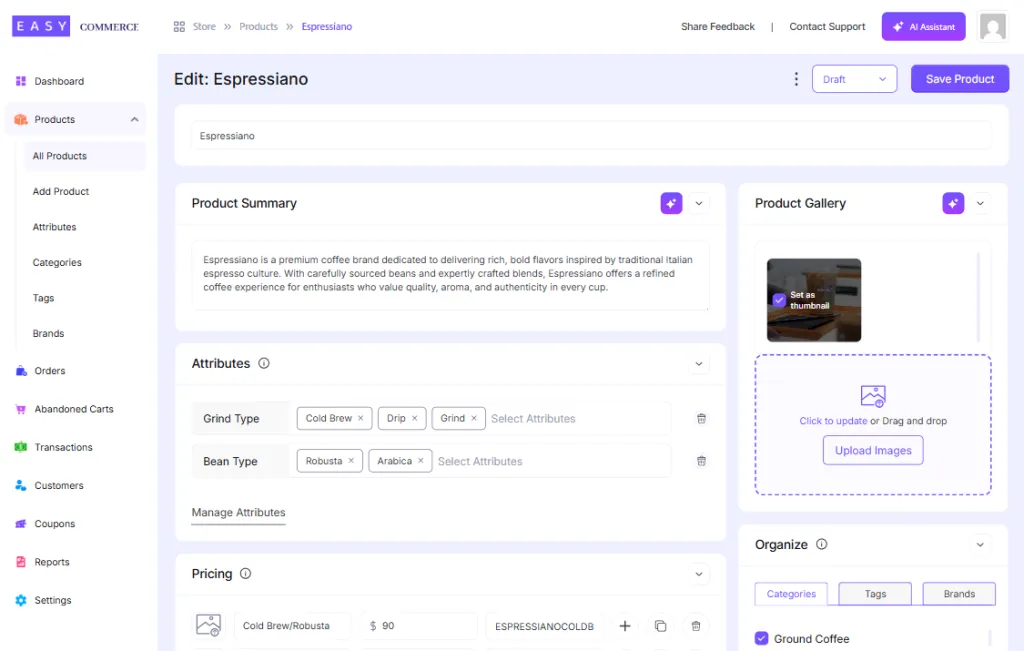
You can write product titles, configure variations, assign shipping and taxation, generate descriptions with AI, and more. Here is what you will find on the product listing page:
-
Product details: Enter the product name, a brief summary, and a full description. Generate the summary and description using AI.
-
Attributes and Variation: Define key product attributes using the attribute manager, and then you can generate the necessary variations.
-
Pricing and inventory: Set product images and customize the display template as needed.
-
Additional settings: Fine-tune visibility settings for your shop and more.
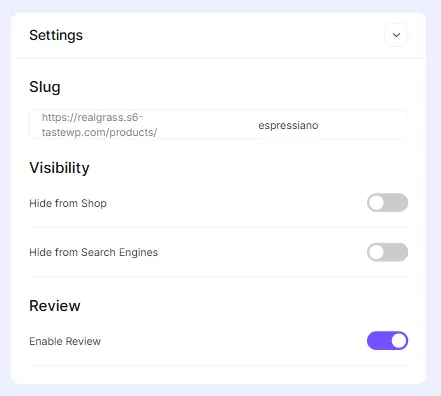
One of the unique things about setting pricing when creating a product is that you can calculate profit for every product. Suppose you have a coffee product whose cost is $35. Now set a price for the product, and it will generate your profit along with the margin.
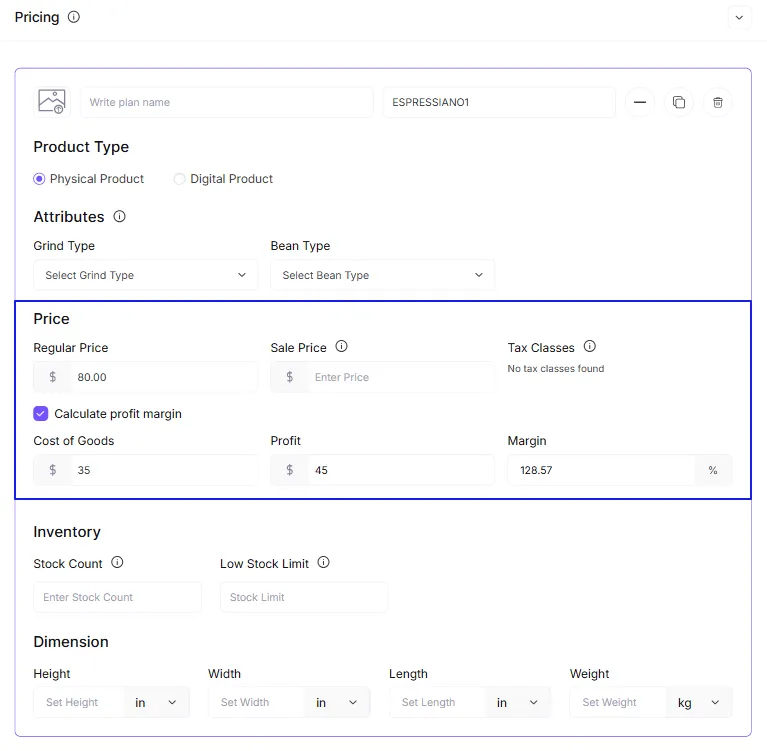
Overall, it’s built for speed and clarity. With the help of AI, you can list more products in less time, with fewer hassles.
4. Order Management
EasyCommerce makes order fulfillment easy with a centralized system to manage every order.
You can view order history, filter by status (e.g., pending, completed, refunded), and send updated or personalized invoices inside the dashboard.
It streamlines day-to-day operations and ensures you never miss an important step in your fulfillment process.
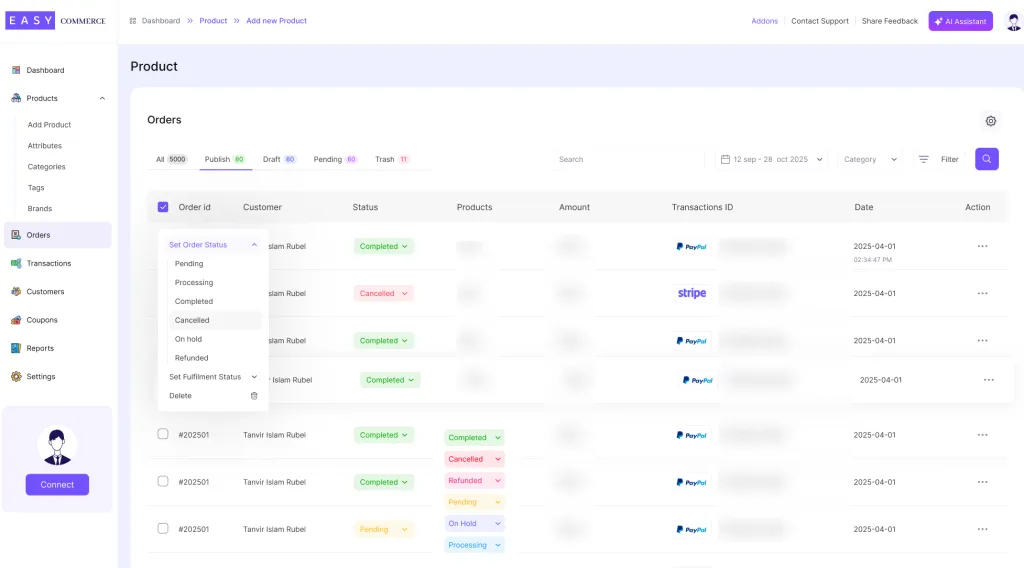
Features you will love when managing orders:
One-click actions: easily manage orders with quick access buttons to issue refunds, send emails, or update fulfillment statuses.
Clear separation for License and Subscriptions: Manage license and subscription orders with a dedicated, organized view.
5. Advanced Reporting
Running an online store means keeping track of performance is key. EasyCommerce comes with built-in advanced reporting to keep you updated.
You can easily check revenue trends, top-selling products, customer behavior, and cart abandonment in one place. It shows you what’s working and what’s not.
With these insights, you can make smarter calls on marketing, pricing, and inventory—without relying on third-party tools.
6. Customization Options
With EasyCommerce, you can design product pages directly using the native WordPress Gutenberg block editor.
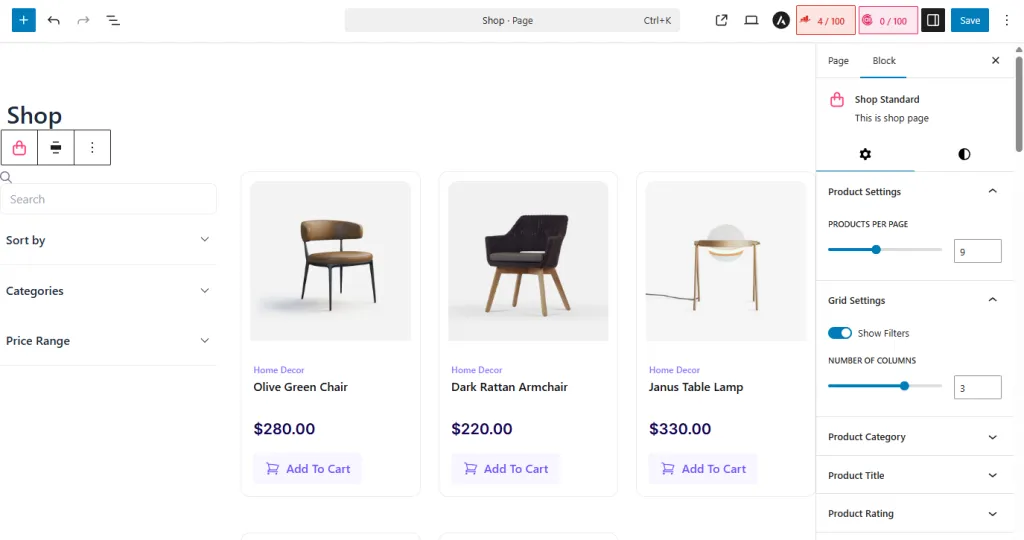
While third-party builders like Elementor, Divi, and Oxygen aren’t available yet, they’re on the roadmap for future support.
You can still customize fonts, colors, layouts, and images to create a store that truly reflects your brand. Default templates are also available to get you started quickly.
Plus, EasyCommerce is introducing the AI Template Generator, which lets you create and customize templates with just a prompt, then save them for repeated use.
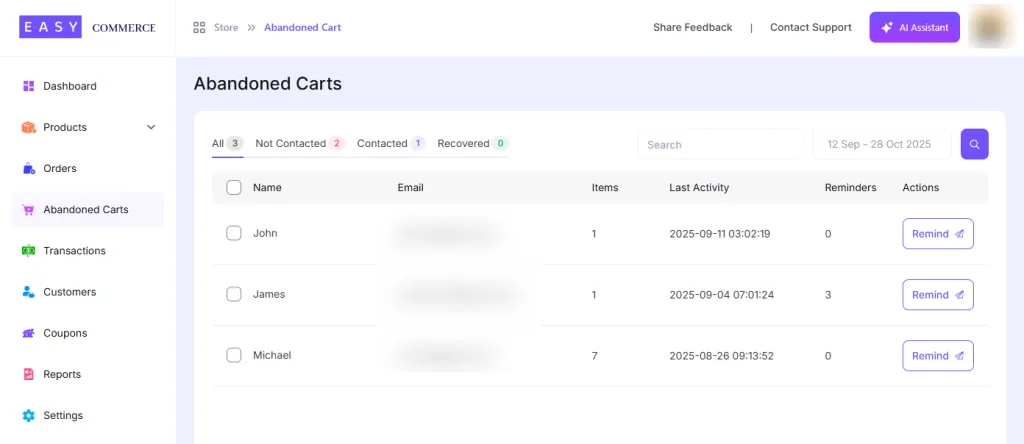
7. Abandoned Cart Recovery
Abandoned carts are one of the biggest missed revenue opportunities in eCommerce. EasyCommerce helps you reclaim them with a built-in recovery system that detects when a customer leaves items in their cart and leaves you the option to send them a reminder email.
8. Personalized Emails
Communication is key in eCommerce, and EasyCommerce makes it personal. Use dynamic placeholders to create custom email templates for everything from order confirmations and shipping updates to thank-you messages and promotions.
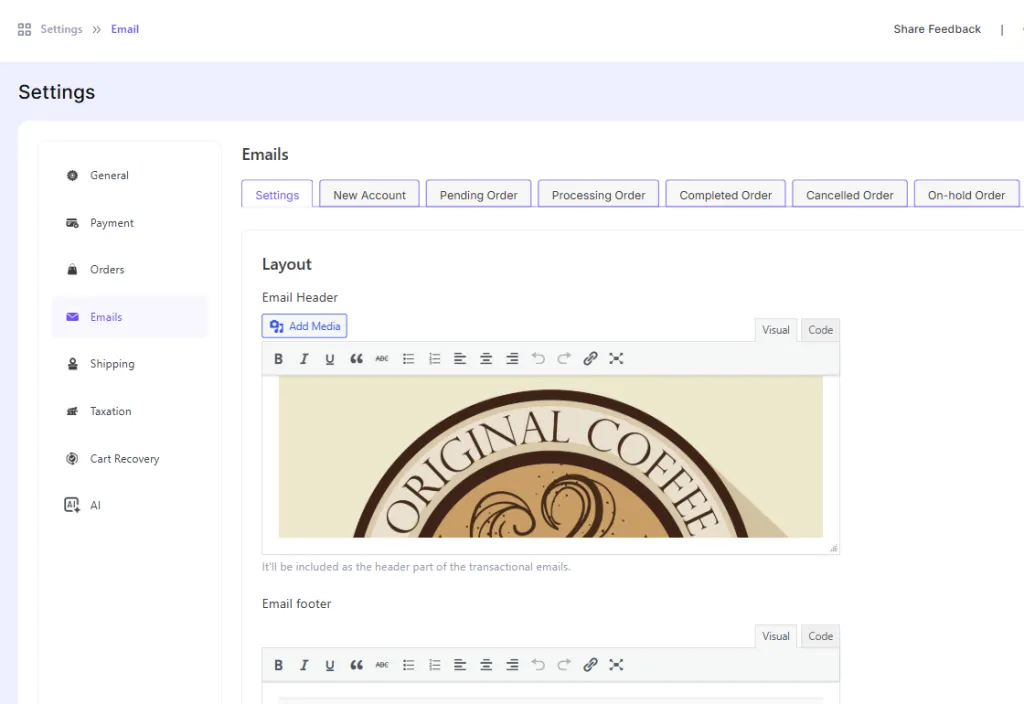
You can include customer names, product details, estimated delivery dates, and more, making every email feel relevant and professional.
Is EasyCommerce the Best WordPress Plugin for eCommerce?
To find out which WordPress plugin is best, we are putting it side by side with two of the most popular options in the space (EasyCommerce vs WooCommerce vs SureCart). Here is how they compare in features, pricing, and overall value.
| Feature | EasyCommerce | WooCommerce | SureCart |
| Ease of Use | Very easy | Moderate, some learning curve | Easy setup |
| Performance | Fast, optimized DB | Slower due to shared DB | Lightweight, good performance |
| Customization | Gutenberg support, drag-and-drop | High via themes/plugins | Limited templates |
| Data Ownership | 100% yours, self-hosted | Self-hosted, full control | Stored on SureCart servers |
| Built-in Features | AI tools, reporting, cart recovery, and more | Needs plugins | Basic features included |
| Pricing | Free core, no fees, paid addons | Free + paid add-ons | Free plan + transaction fees |
| Email & Cart Recovery | Built-in | Requires plugins | Built-in |
| Support | Dedicated team, fast replies, community | Community-based | Direct support, community |
EasyCommerce Integrations and Add-ons
When it comes to integrations and addons, EasyCommerce offers a powerful ecosystem to extend your store’s functionality. It ranges from popular payment gateways, CRM, marketing tools, migration assistance, and more. Many integrations and addons are free to use, while some premium ones deliver deep capabilities.
Here are some glimpses of what EasyCommerce offers in their integrations and addons:
| Category | Examples | Benefit Snapshot |
| Payment Gateways | Stripe, PayPal, Mollie, Braintree, more | Global payment options with seamless setup |
| CRM & Marketing Tools | HubSpot, Klaviyo, Mailchimp | Sync customer data and automate campaigns |
| UX & Sales Enhancers | Wishlist, Product Recommendations | Boost engagement and increase AOV |
| Operations & Design Tools | PDF Invoice, Checkout Editor | Improve workflow and customer experience |
| Migration & Setup Help | WooCommerce, SureCart Migration | Smooth migration, easy transition |
EasyCommerce Pricing Overview
EasyCommerce has two license options on its website: Annual and Lifetime. Both include all features, addons (current and future), premium support, updates, and a 30-day money-back guarantee.
Here is a clear breakdown of their yearly pricing:
- Personal: For a single site, they charge $199.
- Professional: For 10 stores, the pricing is $499.
- Agency: For the agency, it is $799 for 100 stores.
On their Lifetime plans,
- Personal: For a single site, they charge $499.
- Professional: For 10 stores, the pricing is $1250.
- Agency: For the agency, it is $1999 for 100 stores.
Concluding Words
After testing EasyCommerce, it’s clear that this plugin is built with real store owners in mind. It delivers powerful features like AI tools, built-in cart recovery, smart reporting, and more.
Compared to WooCommerce or SureCart, it offers a simpler, faster, and more user-friendly experience. The Lifetime license also adds solid long-term value for those who want full control without ongoing costs.
It’s not perfect. More design flexibility and builder support would be great, but with active development and a clear roadmap. EasyCommerce is already a strong choice for anyone serious about selling on WordPress.
Frequently Asked Questions (FAQs)
1. Is EasyCommerce trustworthy?
Yes, EasyCommerce is a reliable eCommerce solution. It is regularly updated, follows industry security, and offers dependable customer support. User reviews and a growing community further reflect its credibility.
2. Is EasyCommerce free or paid?
In short, it’s freemium. EasyCommerce itself is 100% free, with no locked features hiding behind a paywall. On top of that, we offer optional paid addons that connect your store with third-party tools like payments, CRMs, and automation. They’re only needed if you want extra power.
3. Which is better, Shopify or EasyCommerce?
Actually, both. Shopify is like a ready-made store; you pay monthly, and it works out of the box. However, it’s pricey and you don’t fully control your data. On the other hand, EasyCommerce is WordPress-based, way less costly, flexible, and gives you full control. Think of it as Shopify in WordPress, but with more freedom.
4. Can I sell digital products with EasyCommerce?
Yes, EasyCommerce supports digital products. You can upload files, set download limits, and manage licenses or delivery settings easily, all within the plugin.
5. Can I transfer my WooCommerce store to EasyCommerce?
Yes, using the WooCommerce migration addon that can move your WooCommerce products, customers, and orders flawlessly over to your EasyCommerce store. Just make sure to back up your site and test after migration for a smooth switch.

Written by
Zannatun Nime
September 18, 2025
Zannatun Nime writes about AI, developer tools, and social media marketing in a simple and easy-to-follow way. He enjoys making complex topics clear, practical, and useful for everyday readers.
Related reading

RESOURCES
Best Booking Plugins for WordPress in 2026 – Top Picks for Service Businesses
Discover the best booking plugins for WordPress in 2026. Honest pros, cons & pricing for every top tool. GemBooking leads the list for service businesses.

RESOURCES
Best WordPress Automation Plugins for 2026 (Complete Guide)
You didn't build a WordPress site to spend your days copying form entries into spreadsheets, manually emailing customers after every purchase, or chasing down the same tasks every single week. That gap between what WordPress can do and what it does automatically? That's where most site owners bleed time.

RESOURCES
Best Custom Post Type Plugins for WordPress in 2026 (Free & Pro)
You built your WordPress site. Posts and pages are live. Then your client asks: Can we add a Testimonials section? A Jobs board? A Portfolio gallery? This is where custom post type plugins save you.