
WebToffee Product Import Export for WooCommerce Review: Features, Pricing, and Who It’s For

WooCommerce’s built-in product importer works fine when you’re dealing with a handful of simple products and a clean CSV. The moment you introduce variable products, custom fields, subscription types, or any kind of recurring supplier sync, it starts showing its limits fast. That’s where a dedicated plugin becomes necessary rather than optional. The WebToffee Product…
Zannatun Nime
WooCommerce’s built-in product importer works fine when you’re dealing with a handful of simple products and a clean CSV.
The moment you introduce variable products, custom fields, subscription types, or any kind of recurring supplier sync, it starts showing its limits fast.
That’s where a dedicated plugin becomes necessary rather than optional.
The WebToffee Product Import Export Plugin for WooCommerce is one of the more widely used options in this category, with over 90,000 active installations on WordPress.org and a 4.9 rating on the WebToffee site.
In this article, we will review the WebToffee product import export plugin in detail, covering both the free and pro versions, what the plugin actually does well, where it falls short, and who it makes the most sense for.
Let’s get started.
What the Plugin Does and Who It’s For
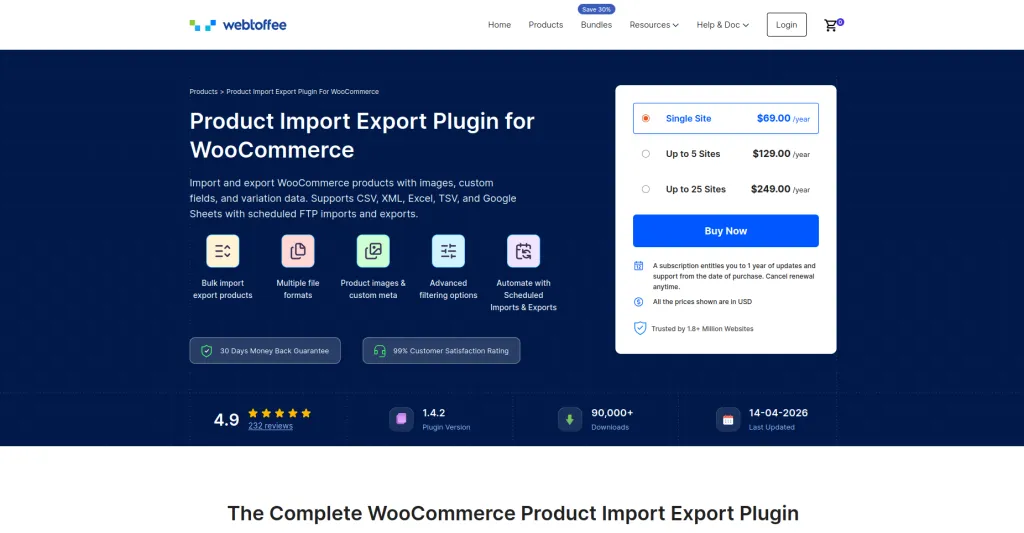
This import export plugin handles one job: importing and exporting WooCommerce product data. It supports all major WooCommerce product types, multiple file formats, advanced filtering on exports, column mapping on imports, and scheduled automation via FTP/SFTP.
This plugin is for products specifically. If you also need to import or export WooCommerce orders, customers, coupons, or subscriptions, that’s a separate plugin.
WebToffee’s Import Export Suite covers all of those, starting at $129/year for a single site.
The store owners who get the most from this plugin typically fall into a few categories: stores migrating from Shopify, Magento, or another platform to WooCommerce; stores with large catalogs that need regular bulk price or stock updates; operations that sync product data with a supplier on a recurring schedule; and anyone who has outgrown WooCommerce’s native CSV importer but doesn’t need a full all-in-one data migration tool. If you’re moving products specifically between two WooCommerce stores, we cover the full process in our step-by-step guide to migrating WooCommerce products from one store to another.
Free vs Pro: What You Actually Get
The free version of this product CSV importer plugin is more capable than most free plugins in this space.
It’s available on WordPress.org with 90,000+ active installations and a 4.6 average rating, and it covers a solid range of import/export operations out of the box.
Here’s what the free version includes:
- Import and export simple, grouped, and external/affiliate WooCommerce products via CSV
- Transfer product data, including images, reviews, categories, tags, attributes, pricing, and stock
- Filter and bulk edit products, categories, prices, stock, and attributes
- Customize imports/exports with batch size control, CSV delimiters, column reordering, and header renaming
- Use Quick, Pre-Saved Template, or Advanced import/export methods with platform-specific column mapping
- Access import/export history, re-run previous jobs, and view debugging logs
- Auto-generate missing product descriptions during import using ChatGPT API integration
That’s a lot for a free plugin. Now let’s look at the comparison between the free and pro versions:
| Feature | Free | Pro |
| Simple, grouped, external products | Yes | Yes |
| Variable and subscription products | No | Yes |
| Downloadable and composite products | No | Yes |
| File formats | CSV | CSV, XML, TSV, Excel, Google Sheets |
| Column mapping | Yes | Yes, with full field coverage including hidden meta |
| Custom fields and hidden metadata | No | Yes |
| Import from URL or FTP | No | Yes |
| Scheduled imports via FTP/SFTP | No | Yes |
| ChatGPT product descriptions | Yes | Yes |
| Batch size control | Yes | Yes, with full advanced options |
| Import/export history and logs | Yes | Yes, with debug logs |
| Composite product support | No | Yes |
| Email alerts on scheduled imports | No | Yes |
The pricing of the pro version of this product import export plugin starts at $69/year for a single site, $129/year for up to 5 sites, and $249/year for up to 25 sites.
The license covers one year of updates and support, auto-renews unless canceled, and comes with a 30-day money-back guarantee.
Export WooCommerce Products with Advanced Filters
The export side of this plugin is flexible from the free version onward. From WebToffee Import Export > Export, you select Products as the post type, choose your export method, and apply filters before generating the file.
The available export filters cover product title, product type, category, tags, SKU, price, quantity, featured status, stock status, product status, created date, description, and short description. You can combine these to generate targeted exports.
The column mapping screen lets you select which fields appear in the export file and reorder them by drag-and-drop.
You can also rename column headers before exporting, which matters when your supplier or ERP expects specific column names in the incoming file.
Product images are exported as URLs included in the product data.
For stores that need image files handled separately, the plugin also supports exporting images into a dedicated file alongside the main export.
In the Pro version, export file delivery can go to a local download, an FTP/SFTP location, or directly to an email address, with scheduling options to run recurring exports automatically in the background.
Import WooCommerce Products with Column Mapping and Bulk Updates
The import flow starts at WebToffee Import Export > Import. Select Products as the post type, choose your import method, and upload your file from a local path. Pro users can also pull from a public URL or FTP location.
The column mapping screen auto-maps columns if your CSV headers match WooCommerce field names.
When they don’t match, you click on a product field and select the corresponding column from your file using a dropdown.
This handles standard fields, metadata, attributes, and taxonomies. In the Pro version, this extends to hidden meta fields and custom fields generated by third-party plugins.
Once you’ve mapped everything correctly, you save it as a template, and every future import from that same source is ready immediately.
The import logic for existing products is sensible. By default, the plugin imports new products, skips products where the ID already exists, and skips conflicting duplicates.
This means running a bulk update import won’t accidentally create duplicate listings. The plugin matches each row to an existing product by SKU or ID and updates only the fields that have changed.
For stores with large catalogs, the batch size control in Advanced Options is worth attention. You can set how many records the server processes per iteration, which prevents timeouts on big jobs.
If an import is timing out, lowering the batch count usually resolves it.
Supported Product Types for Import Export
Both versions handle simple, grouped, and external/affiliate products.
The Pro version also supports variable products, including all their variations and attributes, downloadable products, subscription products via WooCommerce Subscriptions, and composite products with component configurations.
Auto-Generate Product Descriptions with ChatGPT
The ChatGPT integration is available in both free and pro versions, which is worth noting since it’s not a common feature at the free tier for this type of plugin.
When importing a catalog, missing product descriptions are common, especially when pulling data from a supplier feed or an older platform that didn’t store rich content.
With the ChatGPT integration enabled, the plugin generates descriptions automatically for any product that doesn’t have one during import.
You connect your own ChatGPT API key to generate product descriptions. It’s not a replacement for carefully written product copy, but for stores importing hundreds of products that would otherwise go live with blank description fields, it closes a real gap.
Full Import/Export Log History
Every import and export run is logged automatically in the WordPress dashboard. The log shows what was processed, what succeeded, what was skipped, and what failed. You can view and download the import log for debugging purposes.
For scheduled imports, the email alert feature sends a notification when a cron import completes, so you don’t need to log in and check manually after each automated run.
Third-Party Plugin Compatibility
The product import/export plugin handles custom metadata generated by a range of third-party plugins, which is important for stores where standard WooCommerce fields don’t cover everything.
Compatible plugins include WooCommerce Product Bundles, Yoast WooCommerce SEO, WooCommerce Cost of Goods, WooCommerce Extra Product Options, Advanced Custom Fields, All in One SEO, WooCommerce Subscriptions, WooCommerce Price Based on Country, and WoodMart variation gallery, among others.
ACF fields are handled through the include metadata option on export, with the corresponding columns used on reimport.
WPML compatibility exists but currently covers simple products only.
What the WebToffee Product Import Export Plugin Does Well
- Handles large product imports reliably with efficient batch processing
- Saves time with reusable import/export templates for recurring tasks
- Makes it easy to map columns from unstructured supplier files without manual cleanup
- Offers a feature-rich free version compared to many competing plugins
- Includes detailed import/export logs in both free and premium versions for easier troubleshooting
Limitations Worth Knowing
- The plugin only supports product imports and exports; orders, customers, coupons, and subscriptions require the Import Export Suite
- Variable and subscription product support is available only in the Pro version
- No built-in data transformation tools for tasks like bulk price adjustments during import
- The free version supports CSV files only; XML, TSV, Excel, and Google Sheets support is limited to Pro
- WPML compatibility currently works only with simple products
Pricing Summary
The free version is available on WordPress.org by searching “Product Import Export for WooCommerce” under the WebToffee author profile.
Pro licensing: $69/year (single site), $129/year (up to 5 sites), $249/year (up to 25 sites). All plans include one year of updates and support.
The 30-day money-back guarantee means you can test it properly without financial risk.
Related WebToffee Plugins for Complete Store Data Management
The product import export plugin handles products. If your store data management needs go beyond that, WebToffee has dedicated plugins for each additional data type, all using the same interface and workflow.
1. Order, Coupon, and Subscription Import Export for WooCommerce
The Order Import Export Plugin for WooCommerce handles importing and exporting WooCommerce orders, discount coupons, and subscriptions using CSV, XML, TSV, and Excel.
It’s built for stores that need to migrate order history between platforms, keep coupons consistent across multiple stores, or manage subscription data during a store rebuild.
The same three-method workflow applies: Quick, Pre-Saved Template, and Advanced.
Advanced export filtering lets you target specific order sets by status, date range, or customer. Pricing starts at $69/year for a single site.
2. WordPress Users and WooCommerce Customers Import Export
The WordPress Users and WooCommerce Customers Import Export plugin handles bulk import and export of WordPress user accounts and WooCommerce customer data, including custom fields and roles.
Supports CSV, XML, TSV, XLS, and XLSX. Useful for stores migrating platforms, merging customer databases, or syncing user data between a staging and live environment.
Pricing starts at $69/year for a single site.
3. Import Export Suite for WooCommerce
The Import Export Suite for WooCommerce is the all-in-one option. It covers products, orders, customers, coupons, and subscriptions in a single plugin, with the same interface across all data types.
It supports mathematical transformation rules during import, so you can apply bulk price adjustments (for example, reducing all sale prices by 10%) without editing the file first.
If you regularly work with multiple data types, the WooCommerce import/export suite is more cost-effective than buying separate plugins. Starting at $129/year for a single site.
4. WooCommerce Product Feed and Sync Manager
The WooCommerce Product Feed and Sync Manager is a different use case but a natural complement.
It generates product feeds for Google Shopping, Facebook, Instagram, TikTok, and Pinterest, and manages catalog sync with Facebook and Instagram directly.
If your export workflow includes feeding product data to sales channels, this is the tool that handles that side of things. Pricing starts at $89 for a single site.
Conclusion
The WebToffee Product Import Export Plugin for WooCommerce strikes a good balance between ease of use and advanced functionality.
The free version is powerful enough for WooCommerce stores handling simple product imports and exports through CSV, while the Pro version adds the automation, file format support, and advanced product compatibility needed for larger or more complex catalogs.
If your workflow mainly involves updating products, syncing supplier catalogs, or migrating store data into WooCommerce, this plugin covers the process efficiently without adding unnecessary complexity.
Stores that also need to manage orders, customers, coupons, or subscriptions alongside products will be better served by the full Import Export Suite instead.
Overall, for stores that regularly work with bulk product data, the plugin delivers strong value for the price and remains one of the more practical WooCommerce import/export solutions available today.

Written by
Zannatun Nime
May 17, 2026
Zannatun Nime writes about AI, developer tools, and social media marketing in a simple and easy-to-follow way. He enjoys making complex topics clear, practical, and useful for everyday readers.
Related reading

RESOURCES
Best Booking Plugins for WordPress in 2026 – Top Picks for Service Businesses
Discover the best booking plugins for WordPress in 2026. Honest pros, cons & pricing for every top tool. GemBooking leads the list for service businesses.

RESOURCES
Best WordPress Automation Plugins for 2026 (Complete Guide)
You didn't build a WordPress site to spend your days copying form entries into spreadsheets, manually emailing customers after every purchase, or chasing down the same tasks every single week. That gap between what WordPress can do and what it does automatically? That's where most site owners bleed time.

RESOURCES
Best Custom Post Type Plugins for WordPress in 2026 (Free & Pro)
You built your WordPress site. Posts and pages are live. Then your client asks: Can we add a Testimonials section? A Jobs board? A Portfolio gallery? This is where custom post type plugins save you.