
6 Common Mistakes to Avoid When Choosing a WordPress Affiliate Plugin

Setting up an affiliate program sounds simple. Install a WordPress affiliate plugin, invite affiliates, and start earning, right? Not quite! Behind the scenes, small mistakes such as poor tracking, weak commission rules, or slow payouts can seriously damage your complete affiliate marketing program. Affiliates lose trust. Conversions drop. Growth stalls. When over 80% of brands…
Zannatun Nime
Setting up an affiliate program sounds simple. Install a WordPress affiliate plugin, invite affiliates, and start earning, right? Not quite!
Behind the scenes, small mistakes such as poor tracking, weak commission rules, or slow payouts can seriously damage your complete affiliate marketing program. Affiliates lose trust. Conversions drop. Growth stalls.
When over 80% of brands adopt affiliate marketing, you can’t afford to make common mistakes that lead to burned budget, brand damage, or worse – bans.
The good news? These affiliate marketing problems are avoidable.
Here we explore the most common mistakes people make when choosing a WordPress affiliate plugin, and how to avoid them from day one.
1. Choosing a Plugin Without Defining Your Affiliate Model
This is where most affiliate marketing programs go wrong before they even begin.
Not all affiliates promote the same way. Some use blog content and SEO strategies. Others use coupons, social media, or direct partnerships. The thing is, each of these affiliate models works differently and expects different things from your WordPress affiliate plugin.
The mistake: Choosing a WordPress affiliate plugin without first deciding how your affiliates will promote your business.
Why has this become a problem?
A generic setup may track links, but it won’t support:
- Long-term referrals for content creators.
- Coupon-based tracking for influencers.
- Custom commissions for partners or resellers.
This way, your system will start feeling limited and affiliates won’t get rewarded properly. And if they don’t get rewarded as expected, promotion stops.
Simple example:
- A blogger might expect lifetime or recurring commissions.
- An influencer might rely on coupon codes for quick conversions.
If your WordPress affiliate program plugin can’t support both clearly, you lose one of them.
Here’s how to avoid it:
Start with your affiliate strategy, not the plugin.
Ask yourself:
- Who are your ideal affiliates?
- How will they promote your product?
- Do you need recurring, lifetime, or one-time commissions?
After this is clear, choosing the right WordPress affiliate plugin becomes much easier.
2. Choosing Based on Features Instead of Use Case
This is one of the most common and misleading mistakes when selecting an affiliate plugin.
At first glance, it’s easy to compare affiliate plugins in WordPress based on features. More integrations, more settings, more options. It feels like you’re getting more value. Yet in reality, more features is not equal to better results.
Why does this become a problem:
Feature-heavy WordPress plugins for affiliate programs mostly:
- Add unnecessary complexity.
- Slow down your site.
- Make setup confusing.
Worse, you can end up paying for tools you never use, while missing the ones you actually need.
Simple example:
If you run a small WooCommerce store, you likely need:
- Accurate tracking.
- Simple commission rules.
- Easy payouts.
You don’t need:
- Multi-level commission systems.
- Complex enterprise workflows.
- Dozens of unused addons.
Here’s how to avoid it:
Just make sure you pick an affiliate plugin for WordPress based on your needs, not the feature list.
Ask:
- What problem am I trying to solve?
- Which features directly support my affiliate model?
- Will this plugin stay simple as I grow?
This is where lean and conversion-focused WordPress affiliate tools (such as AffiliatePress) stand out. They come with all conversion-focused features such as accurate tracking, flexible commissions, and smooth integrations.
3. Ignoring Attribution Rules (First-Click vs Last-Click)
As we already know, commission attribution rules decide who gets the commission when more than one affiliate is involved in driving a single sale.
Most WordPress affiliate plugins use last-click attribution by default. That means the last affiliate link clicked gets the commission, even if another affiliate originally brought the customer.
This creates common issues like:
- Coupon sites “stealing” commissions at checkout.
- Content creators are not getting rewarded for early influence.
- Confusion and frustration among affiliates.
Simple example:
A blogger writes a detailed review and brings the customer to your online store. Yet, later, the same customer uses a coupon code from another affiliate.
Now, with the last click attribution → the coupon affiliate gets the commission, and the original promoter gets nothing.
Thus, here’s how to avoid it:
Choose a WordPress affiliate plugin like AffiliatePress that gives you full control over commission attribution.
4. Prioritizing UI Over Tracking Accuracy
A clean dashboard sure looks impressive, but it doesn’t guarantee your affiliate program is working.
The mistake here is simple: Most WordPress affiliate plugins come with an impressive UI dashboard, yet no matter how modern and easy to use they are, it’s all in vain if they can’t track with accuracy.
Why does this become a problem:
Many WordPress affiliate plugins rely on:
- Basic browser cookies.
- Weak handling of ad blockers.
- Limited tracking methods.
Now, this leads to:
- Missed conversions.
- Incorrect commissions.
- Frustrated affiliates who feel underpaid.
And once trust is lost, affiliates rarely come back.
Simple example:
An affiliate sends 100 visitors and generates sales, but only half of the visitors get tracked. From their perspective, your affiliate system is unreliable, even if the issue is technical.
Where Reliable Tracking Makes the Difference
This is exactly where performance-focused tools stand out.
Instead of prioritizing just UI, WordPress affiliate program plugins like AffiliatePress are built around real-time, accurate commission tracking.
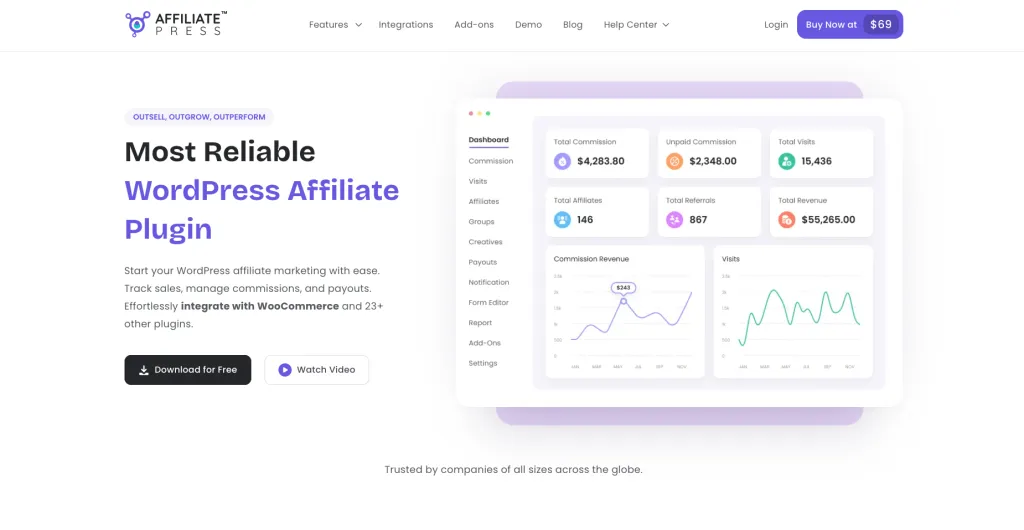
AffiliatePress makes sure every referral, click, and conversion is recorded with precision, so both you and your affiliates see the same reliable data.
Furthermore, this WordPress affiliate management plugin also comes with:
- Real-time commission and referral tracking.
- Coupon-based tracking.
- Reporting and charts in real time.
- Smooth integrations with WooCommerce and 23+ plugins.
- Both admin and affiliate get their own dashboard to track sales for transparency.
The result? Fewer disputes, better transparency, and higher affiliate confidence.
5. No Fraud Prevention Mechanism
Affiliate fraud isn’t rare. It’s expected.
Speaking from experience, we have seen many affiliate marketers not taking security seriously and ending up losing everything, from affiliate trusts, customers’ trust, brand image, to revenue and full affiliate marketing campaigns.
The mistake: Running your affiliate program without any system to detect or control suspicious activity.
Why does this become a problem:
Without fraud protection, your program is exposed to:
- Self-referrals.
- Fake leads or bot traffic.
- Unusual conversion spikes.
- Coupon abuse.
And the worst part? You mostly don’t notice it until payouts are already made.
Simple example:
An affiliate suddenly shows a very high conversion rate compared to others. Without monitoring, it looks like great performance. But the reality is it could be manipulated traffic or fake conversions.
Why You Need Built-In Fraud Protection
This is where using the right tool makes a huge difference.
A WordPress affiliate plugin like AffiliatePress doesn’t just track referrals; it actively protects your complete affiliate marketing program.
AffiliatePress comes with the smartest fraud detection system, so you can:
- Monitor conversion rates to detect unusual activity.
- Set custom thresholds to flag sus affiliates.
- Block specific IPs to prevent repeated abuse.
- Get real-time alerts before payouts are affected.
This means you can stop affiliate fraud before it affects your revenue.
6. Not Looking Beyond Upfront Costs (Hidden Pricing & Renewal Traps)
This is a mistake we’ve seen far too many people make, yet realizing only after the first year of purchasing the affiliate plugin.
At first, a WordPress affiliate plugin looks affordable. Low entry price, decent features, quick setup. Everything seems fine….until renewal time hits.
Here’s where it gets tricky. Almost all popular WordPress affiliate plugins use the same renewal trap. At first, they showed you discounted prices on their pricing page, and after the 1st year, renewal prices jumped to almost double.
The worst part? These renewal terms are written in small fonts, buried somewhere under their pricing page or terms & conditions page, like this:

By the time you realize it, you’re already invested. What started as a “budget-friendly” tool quickly becomes expensive.
Why Transparent Pricing Matters
When costs keep increasing, it affects:
- Your profit margins.
- Your ability to grow.
- Your long-term planning.
Remember, you’re not just choosing a plugin, but committing to an ongoing affiliate management system.
Thus, the Smartest approach is to read all terms before buying any WordPress affiliate plugin.
The good news? AffiliatePress, unlike other WordPress affiliate plugins, takes a more predictable approach:
- Pricing starts at $79.
- 24+ integrations included (no need for multiple paid addons)
- Same renewal pricing – No surprise price jumps in the second year.
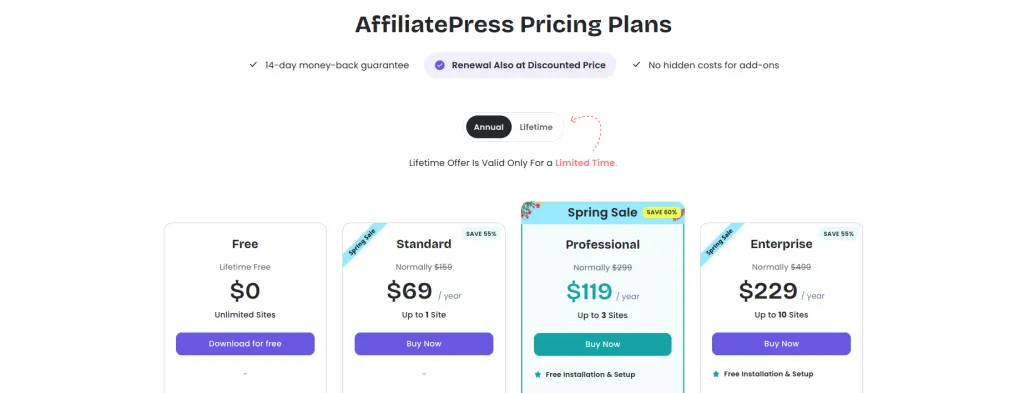
This gives you better cost control as your affiliate marketing program grows.
Final Verdict: How to Choose the Right WordPress Affiliate Plugin
In here, we’ve discussed all the common potholes that too many users fall for when choosing a WordPress affiliate plugin for creating their affiliate program.
If your affiliate plugin fails at tracking, payouts or flexibility, everything else starts to break. Affiliates lose trust. Conversions drop. Growth slows down.
That’s why the smartest approach is to get the most reliable affiliate plugin for WordPress – AffiliatePress.
This affiliate management plugin lets you create your own affiliate program with zero hassle. It brings together:
- Real-time, reliable tracking.
- Multiple smart commission structures (tiered, recurring, lifetime, multi-level, etc.)
- Built-in smart fraud protection.
- One click or automated payouts via PayPal and Stripe.
- 24+ integrations like WooCommerce, LMS, and membership plugins.
All while keeping performance smooth and pricing predictable (starting at $79 with no sudden renewal hikes).
One more thing we forgot to add is if you want to switch or migrate from your existing WordPress affiliate plugin to AffiliatePress, its Easy migration tool gets it done in no time.

Written by
Zannatun Nime
April 20, 2026
Zannatun Nime writes about AI, developer tools, and social media marketing in a simple and easy-to-follow way. He enjoys making complex topics clear, practical, and useful for everyday readers.
Related reading

GUIDE
A Beginner’s Guide To LiteSpeed Caching & WordPress
One thing most website owners these days may overlook when looking for a new WordPress hosting provider is what kind of web server software they use for caching. Caching is what delivers your website faster than the competition. Basically, a version of your website is pre-loaded and ready to be delivered to site visitors with…

GUIDE
How to Build an eCommerce Website with WooCommerce and Elementor
If you’re looking to create a professional eCommerce website, Elementor and WooCommerce are two great tools that you can use. In this article, we’ll show you how to combine the two to create a powerful online store. We’ll walk you through the steps of setting up WooCommerce, and then we’ll show you how to create…

GUIDE
4 Step Guide to Use LMS WordPress Theme with LMS WordPress Plugins
Suppose you have a perfect idea, an perfect execution plan, and an extraordinary team by your side? How would create a website to turn this idea into reality? How would you choose the best LMS WordPress theme and customize it? On WordPress, every business or entrepreneur has a choice to create a website, such as…